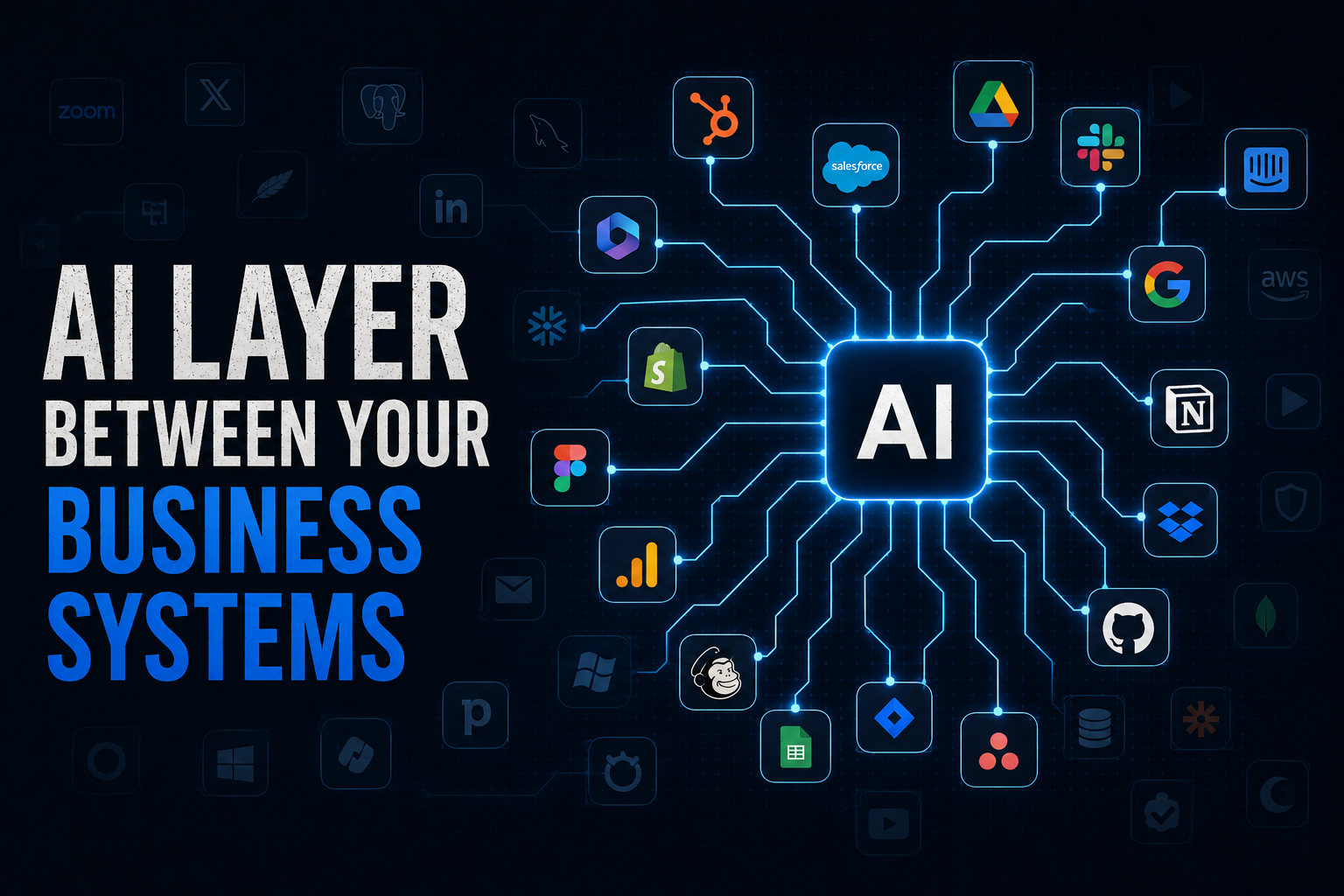
Most businesses already have more data and software than their teams can realistically work across. Customer information sits in the corporate website, CRM, marketing data in advertising, analytics platforms and many more. Each system works well on its own, but the information rarely comes together naturally. This is where AI starts to become much more interesting. Instead of adding another tool for people to use, AI can sit between the systems a company already relies on and work with the information they contain.
Claude changes what is possible. Instead of simply asking an AI a question and getting an answer, Claude can be connected to the systems where your business actually operates and, within the right boundaries, access data, analyze it and potentially take action. This moves AI from being an assistant that generates answers to becoming a layer that can work across the systems your company already uses.
The question is no longer simply whether Claude can answer questions about your business. The more interesting question is whether it can access the right systems, use the right data and perform the right actions without giving it more access than it needs.
There are several ways to create these connections, from native integrations and APIs to MCP servers and browser based access. The right approach depends on the system, the use case and, most importantly, what you want Claude to be allowed to do.
The Real Value Is Across Systems
It is tempting to think about every connection as a separate project. Connect the CRM and ask a question, connect Google Analytics and ask another question, then connect Google Ads and ask another question. But that misses the bigger opportunity. The value is not having five separate AI integrations. The value is having one AI layer that can cross reference information across those systems.
For example, why did a campaign generate a large number of leads according to the advertising platform but perform poorly once those leads reached the CRM? Which campaigns generated traffic but failed to generate qualified opportunities? Did changes in website behavior happen before sales performance changed? Those questions do not belong to a single application. They live across systems, and an AI agent with appropriate access can potentially do much of the work of gathering and comparing that information.
This is where the conversation around AI starts to change. An AI assistant primarily responds to requests. An AI agent can potentially work through a multi step workflow using external tools. Imagine asking, “Identify high value accounts showing increased engagement this month and prepare a prioritized list for sales.” The AI might need to analyze website or product engagement, search the CRM, check previous sales activity, review marketing interactions, enrich the relevant accounts, compare the signals and recommend a next action.
The AI does not need to replace any of those systems. It needs the ability to work across them. A useful way to think about the emerging architecture is Business Systems → Connectors / APIs / MCP → AI Agent → Business Workflow. The applications remain the systems of record, while AI becomes a potential system of action.
Native Connections, APIs and MCP
The easiest option is a native connection. This is when the vendor itself, or the AI platform, has already built the integration for you. You enable it, authenticate your account and the connection is ready to use. Claude supports connections to a growing number of business services, including tools such as Google Workspace, Slack, GitHub and other services through its connector ecosystem. When a native connection exists and provides the access you need, this is usually the first option I would look at because there is less custom configuration, fewer components to maintain and the connection was specifically designed for the platform.
But native connections are not available for every system. Sometimes the vendor has not built one yet, sometimes the tool is too niche or internal to justify building one, and sometimes the vendor simply chooses not to provide one. In those cases, an API is often the next option. An API provides a structured way to communicate with a system, and most mature business platforms already expose some form of API.
MCP, or Model Context Protocol, adds another layer. Originally developed by Anthropic, MCP provides a standardized way for AI applications to discover and use tools exposed by external systems. The ecosystem has expanded quickly, and today you may encounter official vendor MCP servers, remote MCP servers, local MCP servers, community connectors and browser based access through tools such as Claude for Chrome. The important thing is not to decide in advance that MCP is always the answer. I would start by checking for a native connection, then an official API or MCP server, and only after that consider community connectors or browser based solutions. The protocol itself is secondary. The business use case comes first.
It is also worth asking whether an integration is actually worth building. Every connection creates a maintenance commitment. Credentials need to be rotated, permissions reviewed, APIs change and connectors can break when vendors release updates. If you open a tool twice a year, or the AI use case is essentially “read one number from this screen,” building a sophisticated integration probably is not worth the effort. The real value comes from systems you expect AI to query regularly, or from connections that unlock information that the system’s own reporting cannot easily provide.
I saw this firsthand after connecting Claude to a real marketing stack including a CRM, company website, Google Ads, Google Analytics, Search Console and other business systems. The interesting part was not the protocol. It was what happened when the systems could finally be looked at together.
What MCP Actually Is
MCP, or Model Context Protocol, is an open standard originally developed by Anthropic that allows AI applications to interact with external tools and data through a defined interface. Anthropic has compared MCP to USB C: one standardized connection rather than a different custom connector for every device.
There are two broad ways to use MCP. Local MCP servers run on your own computer. You add their configuration directly to Claude’s configuration, and Claude launches them as background processes that communicate with the service using credentials you provide, such as an API key or application password. This approach is useful when you are using a community maintained package, the integration needs to run locally or there is no suitable hosted connector. One practical issue is maintenance, so I strongly recommend keeping a backup copy of your MCP configuration rather than rebuilding your integrations from scratch if something changes.
Remote MCP servers work differently. They are hosted on the internet and connected through Claude’s settings rather than your local configuration, and they must be reachable over HTTPS. If the vendor provides an official remote MCP server, this can often be the simplest option because the vendor operates the integration infrastructure. But remote does not automatically mean safer. You still need to understand who operates the server, what data it can access, what credentials it receives and what permissions those credentials provide. The integration method matters less than the access model behind it.
Security Comes Before the Connection
Before connecting live company systems to an AI tool, there is a much simpler question to answer: how will the AI access your data, and what happens to that data? This should involve your security, privacy or compliance team when appropriate. You need to understand what information will be accessible, where it is processed, what permissions the AI receives, whether the connection is read only or can make changes, how credentials are managed and what happens to sensitive information.
This can include customer data, personal information, employee information, sales data, internal documents, credentials and other information that should not accidentally leave the company’s controlled environment. When I reviewed this internally, one of the most important questions was whether the Claude account we were using would use company data to train the underlying model by default, or whether that was contractually excluded. A paid Enterprise setup, where customer data is not used for general model training under the applicable terms, was an important factor in our decision. The specific answer will depend on the AI vendor, plan, contract and organization, so this should always be verified rather than assumed.
I would also recommend starting with read only connections wherever possible. Write access should be treated as a separate decision. An AI that can read your CRM is one thing. An AI that can modify customer records is another, and an AI that can delete records, change permissions or deploy configuration is something else entirely.
One of the most important decisions in any integration is the account Claude actually logs in as. The instinct is to use your own administrator credentials because it is the fastest way to make everything work. Resist that temptation. Use a dedicated integration identity where the platform requires one, and give it only the permissions required for the specific tasks Claude needs to perform. If Claude only needs to read data, there is no reason for its credentials to be able to modify records, manage users, change configuration or deploy metadata. This is simply the principle of least privilege applied to AI.
Case Study: WordPress
WordPress is a useful example because there are different approaches to exposing WordPress functionality to MCP, and they behave very differently. An older plugin exposes generic REST functions such as list_api_functions, get_function_details and run_api_function. This is powerful because Claude can potentially interact with a broad range of WordPress REST endpoints through a flexible interface, but that flexibility also creates risk. In testing, I found cases where query string parameters passed to run_api_function were silently dropped on GET requests, meaning filtered queries could return unfiltered results.
A newer approach is based on WordPress’s emerging Abilities API. Instead of exposing generic REST access, plugins can register specific named abilities, such as retrieving an SEO score, reading caching settings or pulling image optimization statistics. Claude can then discover and call those individual abilities. This is more structured and can be safer, but the integration is only as useful as the abilities that have actually been registered. On one real site, only four of roughly a dozen active plugins had registered abilities, so the remaining functionality was effectively invisible to Claude regardless of how well the connector itself was configured.
Permissions create another layer of complexity. Some WordPress plugins define their own custom capabilities instead of relying entirely on standard WordPress roles. That means simply switching an integration user from Editor to Administrator may not tell you why a specific action succeeds or fails. In my testing, the solution was not simply granting broader access. It was identifying the specific capabilities each tool actually checked for and granting only those. That is the difference between making an integration work and making an integration appropriately scoped.
Case Study: Salesforce
Salesforce is a particularly interesting example because I would not recommend creating one shared integration user and giving MCP access to everyone in the organization. A better approach, when using Salesforce’s own MCP capabilities, is to let each employee connect through their own Salesforce account and give MCP access only to the people who actually need it. The access and permissions should be defined within Salesforce, so the employee’s existing Salesforce permissions determine what the MCP connection can access.
This is preferable to creating a single highly privileged integration account that becomes a shared gateway for multiple employees. It also makes the access model easier to manage. When someone changes roles or leaves the company, their Salesforce permissions and access can be updated or revoked without having to manage a separate shared AI credential.
Salesforce also illustrates the local versus remote tradeoff well. Community maintained local MCP packages can expose different toolsets for data, metadata and users. Some capabilities are read only, while others can potentially deploy metadata changes or modify permissions. That is a lot of power to give an AI assistant by default, so I would start with the smallest possible toolset, usually data access for queries, and expand only when there is a clear business requirement.
Salesforce also provides official remote MCP capabilities, including read oriented access for object queries. An official remote connector can provide a simpler starting point, but authentication and organization level configuration still matter. The lesson is not that local or remote is always better. The important thing is to understand the authentication model, available permissions and actual actions exposed by the connector, and then give access only to the employees and workflows that need it.
Case Study: Google Ads, Analytics and Search Console
Google’s marketing ecosystem provides another useful example because several products that appear to belong to one ecosystem can have very different authentication models. Google Ads may require a Developer Token, OAuth credentials and a Refresh Token. Search Console and Analytics can involve Google Cloud service accounts and property level permissions. Google also provides official MCP capabilities for Analytics with read oriented permissions.
The important lesson is that “connect Claude to Google” is not actually one integration. It is a collection of different integrations, each with its own authentication model, permissions and potential failure points. This is why understanding the underlying access model matters more than simply finding a connector and clicking “Connect.”
What Connectors Actually Let You Do
Installing a connector does not mean every action will automatically work. There is an important distinction between discovery and execution. Discovery operations tell you what tools and data are available, while execution operations are where permission boundaries become critical.
I recommend testing in this order: read, analyze, recommend, then act. Start by allowing Claude to retrieve information, then let it analyze that information, then consider allowing it to prepare or recommend actions. Only after that should you consider giving it permission to execute those actions automatically. Where write access is genuinely required, a separate and narrowly scoped credential is often preferable. The fact that AI can perform an action does not mean it should be allowed to perform that action.
The Browser Is an Option, Not a Shortcut
MCP connectors are not the only way to bridge Claude into a business system. Claude can also interact with websites through browser based tools such as Claude for Chrome. A browser can reach almost anything with a user interface, including internal dashboards, legacy admin panels, SaaS settings and tools that are unlikely to ever expose an API or MCP connector. For certain use cases, this may be the only practical way in.
But there is an important tradeoff. There is no separate, narrowly scoped integration identity when Claude operates through your browser session. It is operating with your actual browser permissions and session, so a mistake can have the same consequences as if you had clicked the button yourself. Browser based workflows can also be slower and more token intensive than structured API or MCP calls because the AI has to interpret pages, locate elements, navigate and interact with the interface. For that reason, I would treat browser automation as a fallback rather than the default. Wherever possible, an official connector or API is the better option.
The Goal Is Not to Connect Everything
This is probably the most important lesson from experimenting with AI integrations across a real marketing and operations stack. The goal is not to connect every system simply because you can. The goal is to create useful access to the right systems for the right workflows.
If an AI agent is responsible for identifying accounts at risk, it may need access to CRM, customer engagement, support and product usage data. It probably does not need access to every system in the company. If an agent is helping optimize marketing performance, it might need advertising, analytics, CRM and website data.
The question should therefore not be, “What can we connect to Claude?” It should be, “What information and actions does Claude need to perform this business workflow?” That is a much better starting point.
The Emerging Enterprise AI Architecture
For years, enterprise software has largely followed this model: Employees → Applications. People open applications, find information and perform tasks. AI introduces another possible layer: Employees → AI → Applications. And as agents become more capable, the model becomes Employees → AI Agent → Multiple Business Systems → Actions.
The applications do not necessarily disappear. In many cases, they become even more important because they remain the systems of record for the business. The CRM still owns customer data, Analytics still owns behavioral data and marketing platforms still manage campaigns. AI sits above those systems, accessing the right information at the right time and potentially coordinating work across them. That is a very different role from a chatbot.
What I Would Do
If I were starting a new AI integration today, I would start with the workflow rather than the technology. Define what business problem the AI is supposed to solve and identify the minimum data and systems required. Then check for a native integration. If it provides the access you need, use it. If not, check for an official API or MCP server before considering community connectors.
Use the existing identity and permission model of the platform whenever possible. Do not give AI more access than the employee or workflow actually requires. Start read only, prove the value before introducing write access and test what happens when data is missing, permissions are insufficient or the connector returns an unexpected result. Finally, involve security and privacy stakeholders when connecting live company data, especially customer or employee information.
The interesting part of connecting Claude to business tools is not the connection itself. It is what becomes possible after the connection exists. An AI model that can only see the conversation is an assistant. An AI model that can access the right business context, use the right tools and operate within clearly defined boundaries starts to look much more like an agent.
The future is not necessarily about AI replacing your SaaS stack. It may be about AI becoming the layer that connects people to it. The CRM, analytics platform, marketing automation system and internal tools can continue to do what they were designed to do. But instead of employees constantly moving between those systems to answer cross functional questions, AI can increasingly become the interface between them.
The challenge is no longer simply, “Can we connect AI to this tool?” The better question is, “What should AI be able to see, what should it be able to do, and how can we give it that access safely?”
Get that right, and the systems that never had an “Integrate with AI” button suddenly become part of the AI workflow. And that may be where much of the real value of enterprise AI is created.

Ariel Gal is a digital strategist specializing in scalable web platforms, SEO architecture, automation, and AI-enabled growth. His work focuses on turning complex digital systems into reliable business infrastructure.